BitFenix Colossus

3
Posted November 18, 2010 by Joe DiFiglia in Reviews
bitfenix-colossus-00


The back of the Colossus has a few elements worth mentioning as well.  I typically don’t make mention of the rear end of computer cases as they are all pretty much the same, however I do appreciate the addition of 4 round holes that can accommodate 3/4″ OD  clear PVC tubing for those of us that like to cool our rigs with the wet stuff.  Your water cooling gear is protected from sharp edges by incorporating rubber grommets for additional reassurance.  Also, we see here that BitFenix has chosen to design the Colossus with a bottom mounted PSU and this is where attention to detail really starts to shine.  The bottom mounted PSU can be installed in either direction to accommodate a PSU with a cooling fan on the top or bottom as it will pull fresh clean air from the bottom.  As we have not seen a standard defined yet for power supplies it is sometimes overlooked by manufacturers and usually leaves me frustrated.

BitFenix Colossus 06 150x150 BitFenix ColossusBitFenix Colossus 05 150x150 BitFenix Colossus

The interior is really where the meat meets the potatoes.  The case features eight expansion slots that utilize one of the cleanest tool free designs I have seen yet.  The mechanisms are made of plastic but are extremely durable and easy to manipulate.  Each of the eight expansion slots use the same mesh material found protecting your fingers from the 230mm top fan.  Unfortunately, there is no removable motherboard tray, but that ultimately plays into BitFenix’s ideas for cable management.  The non removable motherboard tray has a square section cut out of it already (no Dremel required) to allow us easy access for new CPU cooling solutions.  Being that this design is geared towards gamers, this makes sense… I can’t think of a 3 month stretch that I kept the same CPU cooler installed.  Surrounding the motherboard are seven cutouts that really extend your flexibility for clean cabling.  Each of these are protected, free from sharp edges, fitted with rubber grommets, and are ample in size.

BitFenix Colossus 07 150x150 BitFenix ColossusBitFenix Colossus 08 150x150 BitFenix ColossusBitFenix Colossus 09 150x150 BitFenix Colossus

BitFenix Colossus 10 150x150 BitFenix ColossusBitFenix Colossus 11 150x150 BitFenix ColossusBitFenix Colossus 12 150x150 BitFenix Colossus

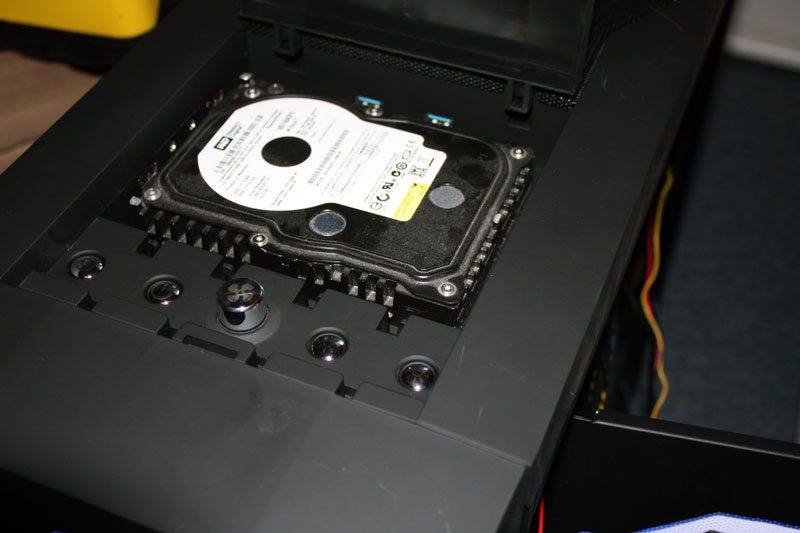
The hard drive rack actually leaves something to be desired.  The Colossus features a tool free design here that utilizes removable hard drive trays which can be bent and flexed to fit around your hard drive and then slide into place.  The design is stable enough once a drive is installed but I would have preferred to see something similar to the approach that Zalman took with their GT1000.  Cooling is of no concern when it comes to your data as this rack is right smack dab in front of the previously mentioned 230mm front intake fan. BitFenix recommends that the drives are installed with the cables being attached from the back of the chassis, as this contributes to an installation that is free from clutter and mess and directly contributes to reducing air flow inconsistencies.  However, if you decide to install the drives with the cables facing you instead of the other side of the chassis you can do so with right angle SATA cables.

BitFenix Colossus 13 150x150 BitFenix ColossusBitFenix Colossus 14 150x150 BitFenix ColossusBitFenix Colossus 15 150x150 BitFenix Colossus

BitFenix Colossus 18 150x150 BitFenix ColossusBitFenix Colossus 16 150x150 BitFenix ColossusBitFenix Colossus 17 150x150 BitFenix Colossus


About the Author

Joe DiFiglia

In early 2000 I became increasingly frustrated with hardware review sites praising less than satisfactory products. The saying: “if you want something done right, do it yourself” applies here. I wasn’t satisfied, so I did it myself; and here we are years later.

BitFenix Colossus

0
Posted November 8, 2010 by Joe DiFiglia in
BitFenix-Colossus-23


The back of the Colossus has a few elements worth mentioning as well. I typically don’t make mention of the rear end of computer cases as they are all pretty much the same, however I do appreciate the addition of 4 round holes that can accommodate 3/4″ OD clear PVC tubing for those of us that like to cool our rigs with the wet stuff. Your water cooling gear is protected from sharp edges by incorporating rubber grommets for additional reassurance. Also, we see here that BitFenix has chosen to design the Colossus with a bottom mounted PSU and this is where attention to detail really starts to shine. The bottom mounted PSU can be installed in either direction to accommodate a PSU with a cooling fan on the top or bottom as it will pull fresh clean air from the bottom. As we have not seen a standard defined yet for power supplies it is sometimes overlooked by manufacturers and usually leaves me frustrated.

BitFenix Colossus 06 150x150 BitFenix ColossusBitFenix Colossus 05 150x150 BitFenix Colossus

The interior is really where the meat meets the potatoes. The case features eight expansion slots that utilize one of the cleanest tool free designs I have seen yet. The mechanisms are made of plastic but are extremely durable and easy to manipulate. Each of the eight expansion slots use the same mesh material found protecting your fingers from the 230mm top fan. Unfortunately, there is no removable motherboard tray, but that ultimately plays into BitFenix’s ideas for cable management. The non removable motherboard tray has a square section cut out of it already (no Dremel required) to allow us easy access for new CPU cooling solutions. Being that this design is geared towards gamers, this makes sense… I can’t think of a 3 month stretch that I kept the same CPU cooler installed. Surrounding the motherboard are seven cutouts that really extend your flexibility for clean cabling. Each of these are protected, free from sharp edges, fitted with rubber grommets, and are ample in size.

BitFenix Colossus 07 150x150 BitFenix ColossusBitFenix Colossus 08 150x150 BitFenix ColossusBitFenix Colossus 09 150x150 BitFenix Colossus

BitFenix Colossus 10 150x150 BitFenix ColossusBitFenix Colossus 11 150x150 BitFenix ColossusBitFenix Colossus 12 150x150 BitFenix Colossus

The hard drive rack actually leaves something to be desired. The Colossus features a tool free design here that utilizes removable hard drive trays which can be bent and flexed to fit around your hard drive and then slide into place. The design is stable enough once a drive is installed but I would have preferred to see something similar to the approach that Zalman took with their GT1000. Cooling is of no concern when it comes to your data as this rack is right smack dab in front of the previously mentioned 230mm front intake fan. BitFenix recommends that the drives are installed with the cables being attached from the back of the chassis, as this contributes to an installation that is free from clutter and mess and directly contributes to reducing air flow inconsistencies. However, if you decide to install the drives with the cables facing you instead of the other side of the chassis you can do so with right angle SATA cables.

BitFenix Colossus 13 150x150 BitFenix ColossusBitFenix Colossus 14 150x150 BitFenix ColossusBitFenix Colossus 15 150x150 BitFenix Colossus

BitFenix Colossus 18 150x150 BitFenix ColossusBitFenix Colossus 16 150x150 BitFenix ColossusBitFenix Colossus 17 150x150 BitFenix Colossus