
QNAP TS-419P+ Turbo NAS Review

0
Posted July 18, 2011 by in QNAP
QNAP-TS-419P-09

Rating

Performance
6.0


Features
8.5


Ease of use
9.0


Design
9.0


Value
7.0


Total Score
7.9

7.9/ 10

Overview

Manufacturer:
 
Number Of Bays:
 
Style:
 
Model: TS-419P+
 
Processor: Marvell 6282 1.6GHz
 
RAM: 512MB DDRIII RAM
 
LAN Port: 2 x 10/100/1000M
 
eSATA: 2 x eSATA II
 
Price (at time of review): $479.99
 

The days of using thumb drives and floppy disks to store your valuable data are gone. Today the options are many and for those of us looking for an easy to use storage solution, QNAP thinks they have the answer. The idea of a home server is nothing new and Microsoft has been trying to attack this market with their Windows Home Server operating system. What users may not know about is that companies that have been producing NAS systems for business recognized your needs and are starting to release products that fit very well in the home office or small office. These systems are small, use very little power, pack a ton of features, and are easy to use.

by Joe DiFiglia
Full Article


The days of using thumb drives and floppy disks to store your valuable data are gone. Today the options are many and for those of us looking for an easy to use storage solution, QNAP thinks they have the answer. The idea of a home server is nothing new and Microsoft has been trying to attack this market with their Windows Home Server operating system. What users may not know about is that companies that have been producing NAS systems for business recognized your needs and are starting to release products that fit very well in the home office or small office. These systems are small, use very little power, pack a ton of features, and are easy to use.

For those of you that may not know what a NAS is… it is an acronym for Network Attached Storage. NAS systems have been a staple in business environments and are gaining popularity in the home due to their small footprint, their low power consumption, their ability to serve up files easily to many different platforms, and their simple configuration. Traditional home servers have either been large devices that run sophisticated operating systems, or smaller home intended devices with similar operating systems that just don’t seem to fit the bill. Lately, I have met many people that have been or will convert from WHS (Windows Home Server) to a NAS because of varying reasons. Amongst the other limitations of traditional Windows based home servers are the need for Anti Virus (that’s not always a bad thing!), constant updates, server knowledge, and much more. Granted, I have a server in my garage that is home to 24 terabytes of storage and runs Windows Server 2008 R2… but then again, I tend to bend the line. For people that want an easy to operate product that can be administered from anywhere with little setup time and easy expandability, QNAP submits to you the TS-419P+.
QNAP TS 419P 09 500x395 QNAP TS 419P+ Turbo NAS Review

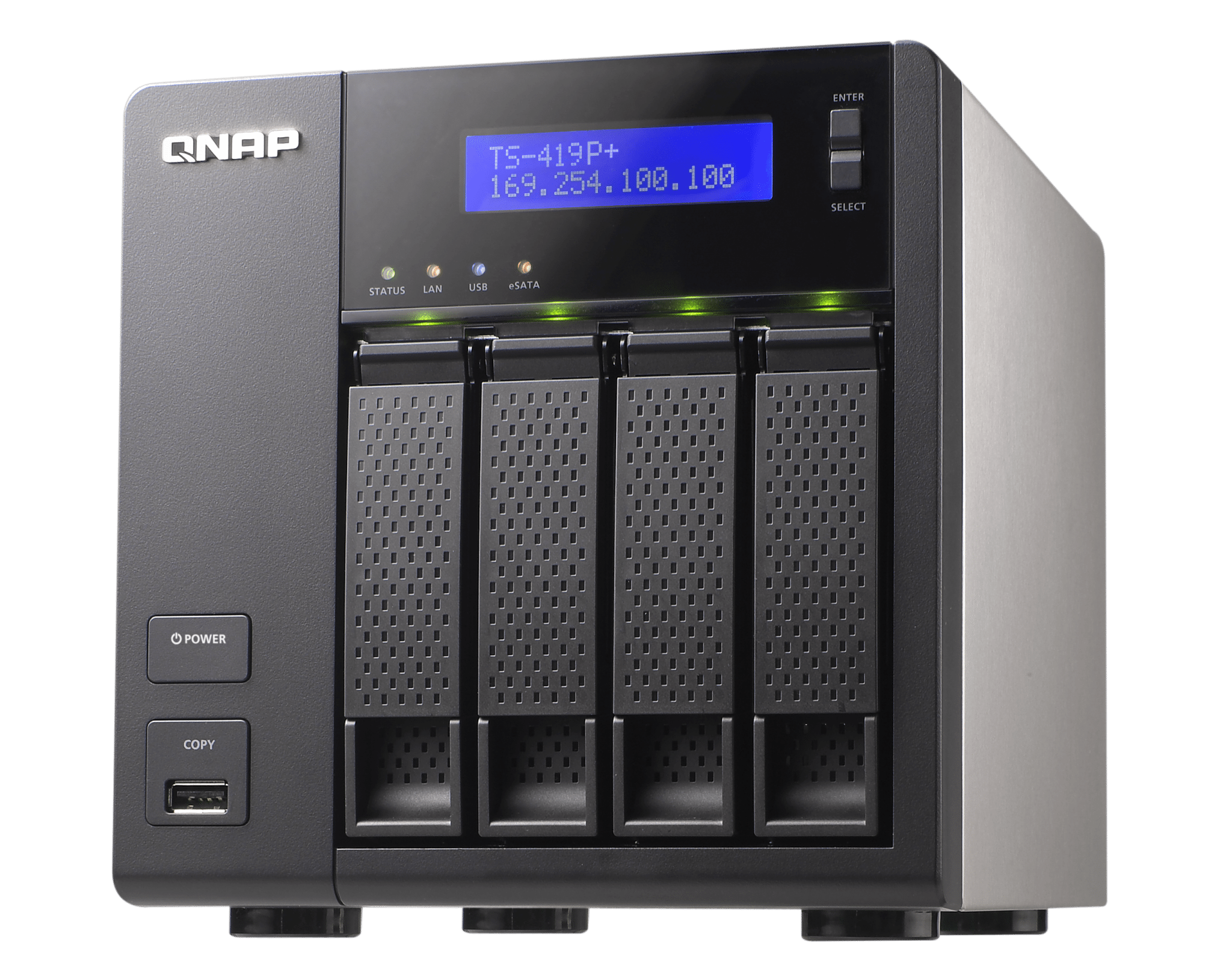
If you are the type that cares about what is under the hood, the TS-419P+ sports a Marvell 6282 1.6GHz processor, 512MB of DDRIII RAM, 16MB of Flash Memory (this is where the OS resides), supports up to 4 hot swappable hard drives, 2 gigabit Ethernet ports, 4 USB 2.0 ports (1 in the front and 3 in the back), 2 eSATA ports, a back-lit LCD screen, 1 cooling fan, 120W power adapter, weighs in at 6.61 lbs (without drives), and measures 6.97 in. x 7.09 in. x 9.25 in.

The LCD screen is a nice touch and displays some basic information about your NAS like your IP address, the Make, Model, Firmware Version, and shows you an error if your Ethernet is disconnected. If you hold the Enter Button on the LCD down longer you can display an advanced menu that shows you:

  1. TCP/IP
  2. Physical disk
  3. Volume
  4. System
  5. Shutdown
  6. Reboot
  7. Password
  8. Back

It is possible for you to configure some of the settings on the TS-419P+ from the LCD screen but I found it cumbersome to navigate and would much rather use the included software. After nearly 2 months of usage, I can tell you that I never even look at the LCD screen anymore unless it displays an Ethernet error. The LED indicators for each drive are a nice touch but do not blink or change color with activity, they are just “lit” if there is a drive present and are barely noticeable in bright light.

QNAP TS 419P 06 QNAP TS 419P+ Turbo NAS Review

Hidden beneath all the hardware is a customized Linux operating system with all the things one may need to run a NAS. Don’t be scared, you need not know Linux to use the TS-419P+ as everything is done through a web interface. With the flexibility that QNAP built into these devices, they provide you with the ability to easily create and look after complex RAID (Redundant Array of Inexpensive Disks) arrays with ease and provide you with a slew of features to wet your whistle:

QNAP TS 419P 08 QNAP TS 419P+ Turbo NAS Review

QNAP TS 419P 05 500x314 QNAP TS 419P+ Turbo NAS Review


About the Author

Joe DiFiglia

In early 2000 I became increasingly frustrated with hardware review sites praising less than satisfactory products. The saying: “if you want something done right, do it yourself” applies here. I wasn’t satisfied, so I did it myself; and here we are years later.

QNAP TS-419P+ Turbo NAS

0
Posted July 18, 2011 by in QNAP
QNAP-thumbnail-logo

Rating

Performance
00


Features
00


Ease of use
00


Design
00


Value
00


Total Score
00

0/ 10

Overview


eSATA: 2
 

The days of using thumb drives and floppy disks to store your valuable data are gone.  Today the options are many and for those of us looking for an easy to use storage solution, QNAP thinks they have the answer.  The idea of a home server is nothing new and Microsoft has been trying to [...]

by Joe DiFiglia
Full Article


The days of using thumb drives and floppy disks to store your valuable data are gone.  Today the options are many and for those of us looking for an easy to use storage solution, QNAP thinks they have the answer.  The idea of a home server is nothing new and Microsoft has been trying to attack this market with their Windows Home Server operating system. What users may not know about is that companies that have been producing NAS systems for business recognized your needs and are starting to release products that fit very well in the home office or small office.  These systems are small, use very little power, pack a ton of features, and are easy to use.

For those of you that may not know what a NAS is… it is an acronym for Network Attached Storage.  NAS systems have been a staple in business environments and are gaining popularity in the home due to their small footprint, their low power consumption, their ability to serve up files easily to many different platforms, and their simple configuration.  Traditional home servers have either been large devices that run sophisticated operating systems, or smaller home intended devices with similar operating systems that just don’t seem to fit the bill.  Lately, I have met many people that have been or will convert from WHS (Windows Home Server) to a NAS because of varying reasons.  Amongst the other limitations of traditional Windows based home servers are the need for Anti Virus (that’s not always a bad thing!), constant updates, server knowledge, and much more.  Granted, I have a server in my garage that is home to 24 terabytes of storage and runs Windows Server 2008 R2… but then again, I tend to bend the line.  For people that want an easy to operate product that can be administered from anywhere with little setup time and easy expandability, QNAP submits to you the TS-419P+.

QNAP TS 419P 09 500x395 QNAP TS 419P+ Turbo NAS

If you are the type that cares about what is under the hood, the TS-419P+ sports a Marvell 6282 1.6GHz processor, 512MB of DDRIII RAM, 16MB of Flash Memory (this is where the OS resides), supports up to 4 hot swappable hard drives, 2 gigabit Ethernet ports, 4 USB 2.0 ports (1 in the front and 3 in the back), 2 eSATA ports, a back-lit LCD screen, 1 cooling fan, 120W power adapter, weighs in at 6.61 lbs (without drives), and measures 6.97 in. x 7.09 in. x 9.25 in.

The LCD screen is a nice touch and displays some basic information about your NAS like your IP address, the Make, Model, Firmware Version, and shows you an error if your Ethernet is disconnected.  If you hold the Enter Button on the LCD down longer you can display an advanced menu that shows you:

  1. TCP/IP
  2. Physical disk
  3. Volume
  4. System
  5. Shutdown
  6. Reboot
  7. Password
  8. Back

It is possible for you to configure some of the settings on the TS-419P+ from the LCD screen but I found it cumbersome to navigate and would much rather use the included software.  After nearly 2 months of usage, I can tell you that I never even look at the LCD screen anymore unless it displays an Ethernet error.  The LED indicators for each drive are a nice touch but do not blink or change color with activity, they are just “lit” if there is a drive present and are barely noticeable in bright light.

QNAP TS 419P 06 QNAP TS 419P+ Turbo NAS

Hidden beneath all the hardware is a customized Linux operating system with all the things one may need to run a NAS. Don’t be scared, you need not know Linux to use the TS-419P+ as everything is done through a web interface.  With the flexibility that QNAP built into these devices, they provide you with the ability to easily create and look after complex RAID (Redundant Array of Inexpensive Disks) arrays with ease and provide you with a slew of features to wet your whistle:

QNAP TS 419P 08 QNAP TS 419P+ Turbo NAS

QNAP TS 419P 05 500x314 QNAP TS 419P+ Turbo NAS