 Computing on Demand PC News & Reviews

To access this: simply type the IP address of your server and the port number: example: http://192.168.1.150:8085

Unfortunately, this application doesn’t come with a service installer. That means that you will either have to be logged into your homeserver to have the application gather data, or install it as a service manually. Luckily, AnyService Installer add-in can help us out with this, but you have to have the Windows 2003 Resource Kit installed for this to work (remember, you are still on your WHS).
- AnyService Installer: http://forum.wegotserved.co.uk/index.php?autocom=downloads&showfile=7
- Windows 2003 Resource Kit: Windows 2003 Resource Kit Download
To install the Windows 2003 Resource Kit Simply double click the executable from the download link and follow all the default options.
The same pretty much goes for the AnyService Installer, but when prompted to enter information populate the fields as follows (From the Top menu select Mode and Advanced:
- C:\Program Files\Windows Resource Kits\Tools
- C:\Program Files\Codebox\BitMeter\BitMeter2.exe
- BitMeterII
- Blank
- Blank
- Your Administrator Account
- Your Administrator Password
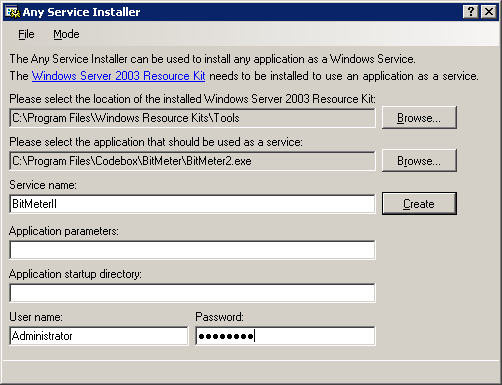
Then hit “Create” to finish the process. All that is left to do is start the service .
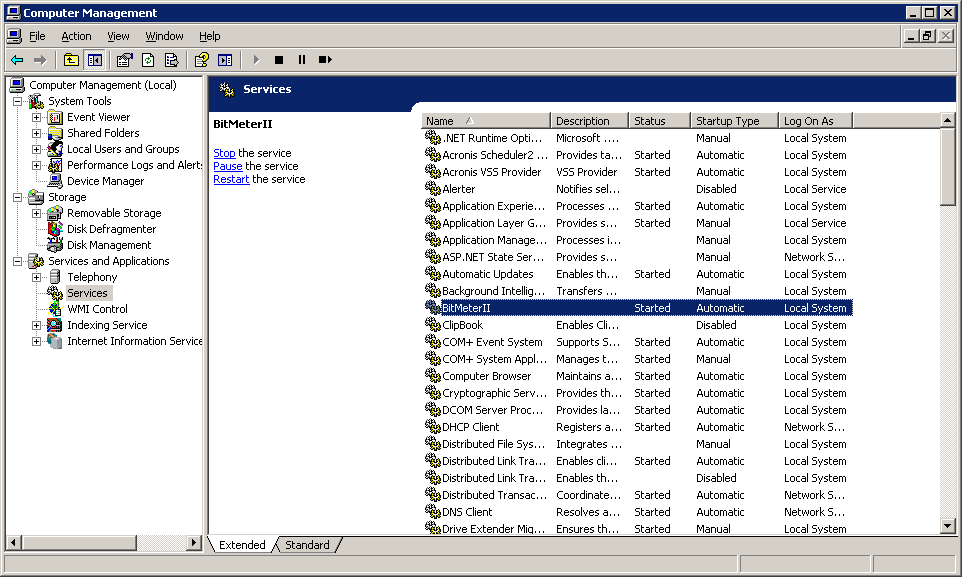
- Right click on My Computer from your Windows Home Server and choose “Manage”
- Expand “Services and Applications”
- Click on Services
- In the right payne right click on BitMeterII and choose “Start”


I don’t know what ive done wrong but it’s counting network traffic aswell as internet traffic. I did click bypass poxy for local traffic…So I don’t know