 Computing on Demand PC News & Reviews
Many XP users have been blaming Service Pack 3 for breaking remote desktop connections to their machines. I, for one, have been unable to RDC into my Windows XP machine since the upgrade to Service Pack 3 as well. However, the issue isn’t with Service Pack 3 at all! Nvidia is at fault!
I spent days (counted the hours) trying to figure out what changed in Service Pack 3 that would break Remote Desktop. Visiting the Microsoft site and learning about the new security measures and how to enable the Credential Security Service Provider yielded no results.
In case you are interested:
- http://support.microsoft.com/kb/951616/en-us
- http://support.microsoft.com/kb/951608/
Oddly, around the same time I installed Service Pack 3 I also updated my nVidia drives to help me connect a Windows XP machine to a television in my office. This is where the problem comes from. Unfortunately, I can’t tell you which versions of the driver the issues start with; I can tell you how to fix it.
NOTE: Editing the Registry incorrectly can cause serious, system-wide problems that may require you to re-install your operating system to correct them. Microsoft nor computingondemand.com cannot guarantee that any problems resulting from the use of Registry editing can be solved. Back up your registry first, but use at your own risk.
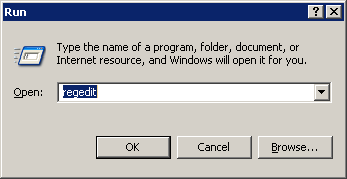
- Start, Run, type regedit and press OK
- Navigate to the Key: [HKEY_LOCAL_MACHINESYSTEMCurrentControlSetControlSession ManagerMemory Management]
- Right click in the Details pane and Select New –> DWORD Value
- Name it: SessionImageSize
- After it is created, double click on it and change its value to: 20
- Exit the Registry Editor and Reboot.
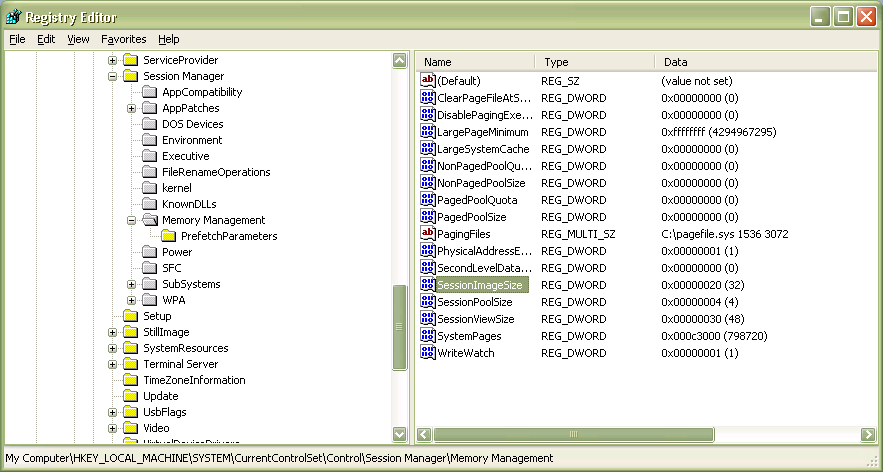
I also have a .reg file you can download: nvidiaregfix
As always, right click and verify its contents before importing into your Regsitry.
[HKEY_LOCAL_MACHINESYSTEMCurrentControlSetControlSession ManagerMemory Management] “SessionImageSize”=dword:00000020


Hi Joe! First, pardon my poor English!
My friend, it appears that this problem persists still today, and it is still related to Nvidia vídeo card!
For years my RDC works at my Windows 7 machine, with onboard Intel HD Graphics. For about 3 months I upgraded to Windows 10. No problems with RDC!
But, on last november, I bought an NVIDIA GeForce 8400GS, instaled it with the latests drivers and after the first reboot, all connections were accepted locally and from the internet.
However, after the next reboot, when I tried to remotelly connect to this machine, the autentication has no problem, but the cliente closed after put the right password without error!
Now I discovered that deleting the nvidia vídeo driver and rebooting I can connect any times, until the next reboot…
Any idea?
Thanks!
Wow, that fix is easy, and useful too! Now I can remote to a Dell Precision T3400 with an nVidia Quadro NVS 290. Thank you!
Maybe this thread should be revived? I have tried the fix, (several times with reboots), triple checked, and still no RDP. I know it is the driver, uninstalled the nvidia driver and was able to remote. Put it back, no go. Any thoughts?
I wish I even had a system running XP to test again! I will see what I can work out though… hang tight
Having the same issue with a GTX 280. Applied the reg update and still no RDP 🙁
latest update from nvidia resolved my RDP issue with a quadro nvs285
Thank you so much. It worked perfectly! I have a pain customer that every issue is my fault. Thank you for the great experience and input.
This worked perfectly! Each time an attempt was made to connect from the host to the client, the client session would freeze and only a hard shutdown would bring the system back up again. I modified the registry as stated here rebooted, that instantly fixed the issue. Thanks!
One more thank you. I was vexed by two Dells that had these woes. One day folks will write beautiful songs about you.
One more “Worked for me!”.
NVidia GeForce 6200, 178.24, XP Pro SP3
Thanks!
Thanks so much for posting this! I just bought a new HP laptop with an NVidia GT230M video card, and your post fixed my aggravating problem!
THANK YOU SO MUCH!! This solved my problem with a new rack mount Dell R5400, Quadro FX570. Straight out of the box, couldn’t remote into it. Got the wonderful “tsddd.dll failed to load” Just spent 4 hours searching and trying new drivers to solve this. Thank you again!!
This solved the problem for me. I had the “latest” drivers for a nVidia GeForce FX5200 (5/16/2008: 6.14.11.7519), and RDC just disconnected immediately when connecting. I could go back to a 2003 driver, but it didn’t support the resolutions I wanted. This solved the problem perfectly. I only wish I had a remote clue as to what the solution actually does/did. Thanks! I’m amazed!(no hats off to nVidia here – lame…)
Worked as advertised on NVS 290. Thanks for the post, saved me lots of time.
Thank You VERRRRY VERRRRY MUCH
now it works like a charm! 🙂
My problem with Remote Desktop was on 70 HP XW4600 workstation PC’s with nVidia Quadro graphic card. I know, that new version of drivers solved this issue, but problem was how to update drivers without login to RDP… I spent hours tying to solve this case, but then I googled Your solution 😀 and I’m happy now 😉
Greetings from Poland! 1 more time – thanx 4 sharing!
This worked on an nVidia 9300. Thanks!!
Running Quadro 140M on a Dell Latitude (dual monitor set-up) and Remote Desktop won’t open a window. (It used to work, but it’s been several updates since I tried to use it). The SessionImageSize DWORD was already in the registry with a setting of 0x00000030. Is the “key” to this fix the presence of the DWORD, or is it the value associated with it?
Just noted that I’m running driver 185.85. I’m going to try to revert to an earlier version.
nice work. fix works perfectly!
This was a real puzzle until I found your post. Many many thanks!! Setting it to 0x20 worked great for our nvs 290
My god, you’re a life-saver, how’d ya find out about this ridiculously hidden reg-key ? (7200GS)
Lots of research!
Hi
Problems still persist with 182.85, I’ve once again rolledback to 178.13. I’m using a session size of 42 (64MB) which is whats stable with the dual nvidia setup I’m running.
http://lair.moria.org/blog?p=156 for more details
Worked for me!
Thanks a lot for posting your solution!!!!!
It really helped me a lot!
XP Pro French SP3
Nvidia onboard video card
Joe, fantastic sleuthing work and thanks so much for tracking this down. I’ve been bashing my head against a wall for months trying to solve this. I even bought a new nvidia card, which didn’t help (for obvious reasons).
RDP now working with a GeForce 9800 GTX+
You sir, are a hero. This has been a major problem for like 3 weeks. I was about to reinstall windows on 3 computers to try and fix this. Thank you.
It works for me!
8400GS!
This saved me a TON of problems… Thanks Joe!
Thanks for the tip – it helped save a major headache with a remote client.
Joe… I love you for a lack of better words! This absolutely worked and is the craziest thing I have ever dealt with. I’ve been deleting registry keys, reinstalling old chipset drivers for the Nvidia card, diagnosing what seemed to be networking problems for 3 days straight. Adding the key works! Thank you Joe! I cannot say that enough!
Glad I can help, this was troubling me for quite some time!