 Computing on Demand PC News & Reviews
Installation is not as easy as it should be, and as with the DiamondCool II there are some kinks that need to be worked out. First, the hardware for mounting this unit is easy to assemble. Simply screw the mounting hardware in with the provided screws. That seams easy enough right? Better have a magnetic screwdriver! The holes are tiny and don’t exactly line up. Not an issue though, I can get past that. Installing this thing on my motherboard though, isn’t exactly painless, and I like painless. Remove the motherboard, install the back plate, reinstall the motherboard, blah blah blah. What I don’t like having to do is removing an already installed fan to install the heat sink to the back plate I just had to remove my motherboard to install. The fan covers the mounting screws. If you are going to require me removing the fan to install, don’t ship the unit with the fan installed. (For those of you counting, that is 8 variations of the word install)


Will the VertiCools performance warrant removing my motherboard? To see, we will test this unit in my standard test rig. ECS KN1-Extreme, an Athlon 64 3000+, an Albatron GFX 5750, some PQI Turbo 3200 (2×512), a bunch of HDD’s (6 of them), an Antec TruePower 550 PSU, and all sitting inside my Lian Li PC-70. The testing will consist of a couple of numbers. There will be the idle temperature, the ambient temperature at each level (room temperature), and the 100% load temperature. These numbers will be gathered in three runs for each idle and load environments. CPU Voltage is at 1.550V. The chart below will show the difference between all of the gatherings.

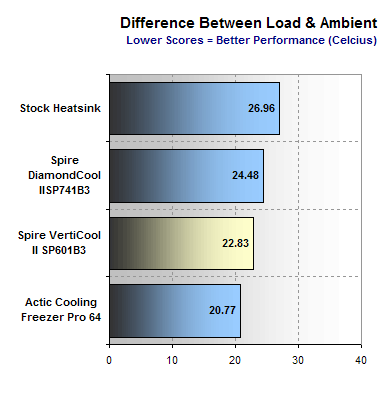

I am a bit surprised to see this unit perform as well as it did. With its lightweight specifications it actually pulled out some power punches, quietly. The performance is enough to get past the installation process. With everything said and done, I can sleep at night knowing that my testing is complete and that my processor is safe. Sporting a price tag of approximately $29.00 this unit can move up your list as a top contender. Bottom line, would I buy one? At $29.00, yes I would.


